Correlograms & ISI#
Let’s generate some data. Here we have two neurons recorded together. We can group them in a TsGroup.
ts1 = nap.Ts(t=np.sort(np.random.uniform(0, 1000, 2000)), time_units="s")
ts2 = nap.Ts(t=np.sort(np.random.uniform(0, 1000, 1000)), time_units="s")
epoch = nap.IntervalSet(start=0, end=1000, time_units="s")
ts_group = nap.TsGroup({0: ts1, 1: ts2}, time_support=epoch)
print(ts_group)
  Index    rate
-------  ------
      0       2
      1       1
Autocorrelograms#
We can compute their autocorrelograms meaning the number of spikes of a neuron observed in a time windows centered around its own spikes.
For this we can use the function compute_autocorrelogram.
We need to specify the binsize and windowsize to bin the spike train.
autocorrs = nap.compute_autocorrelogram(
    group=ts_group, binsize=100, windowsize=1000, time_units="ms", ep=epoch  # ms
)
print(autocorrs)
           0     1
-0.9  0.9800  1.09
-0.8  1.0475  0.94
-0.7  1.0275  1.23
-0.6  1.0200  0.91
-0.5  1.0075  1.17
-0.4  0.9475  1.04
-0.3  1.0475  1.24
-0.2  1.0175  1.05
-0.1  0.9950  0.92
 0.0  0.0000  0.00
 0.1  0.9950  0.92
 0.2  1.0175  1.05
 0.3  1.0475  1.24
 0.4  0.9475  1.04
 0.5  1.0075  1.17
 0.6  1.0200  0.91
 0.7  1.0275  1.23
 0.8  1.0475  0.94
 0.9  0.9800  1.09
The variable autocorrs is a pandas DataFrame with the center of the bins
for the index and each column is an autocorrelogram of one unit in the TsGroup.
Cross-correlograms#
Cross-correlograms are computed between pairs of neurons.
crosscorrs = nap.compute_crosscorrelogram(
    group=ts_group, binsize=100, windowsize=1000, time_units="ms"  # ms
)
print(crosscorrs)
          0
          1
-0.9  1.045
-0.8  0.925
-0.7  0.970
-0.6  1.065
-0.5  0.915
-0.4  0.955
-0.3  0.880
-0.2  0.980
-0.1  0.840
 0.0  0.970
 0.1  1.020
 0.2  0.955
 0.3  0.885
 0.4  0.945
 0.5  1.105
 0.6  1.025
 0.7  0.945
 0.8  0.910
 0.9  1.010
Column name (0, 1) is read as cross-correlogram of neuron 0 and 1 with neuron 0 being the reference time.
Event-correlograms#
Event-correlograms count the number of event in the TsGroup based on an event timestamps object.
eventcorrs = nap.compute_eventcorrelogram(
    group=ts_group, event = nap.Ts(t=[0, 10, 20]), binsize=0.1, windowsize=1
    )
print(eventcorrs)
             0          1
-0.9  1.360544   0.000000
-0.8  1.360544   0.000000
-0.7  1.360544   0.000000
-0.6  1.360544   0.000000
-0.5  0.000000   0.000000
-0.4  0.000000  10.256410
-0.3  0.000000   5.128205
-0.2  0.000000   0.000000
-0.1  0.000000   0.000000
 0.0  0.000000   0.000000
 0.1  0.000000   0.000000
 0.2  0.000000   0.000000
 0.3  0.000000   0.000000
 0.4  0.000000   0.000000
 0.5  2.721088   0.000000
 0.6  0.000000   0.000000
 0.7  0.000000   0.000000
 0.8  1.360544   5.128205
 0.9  0.000000   0.000000
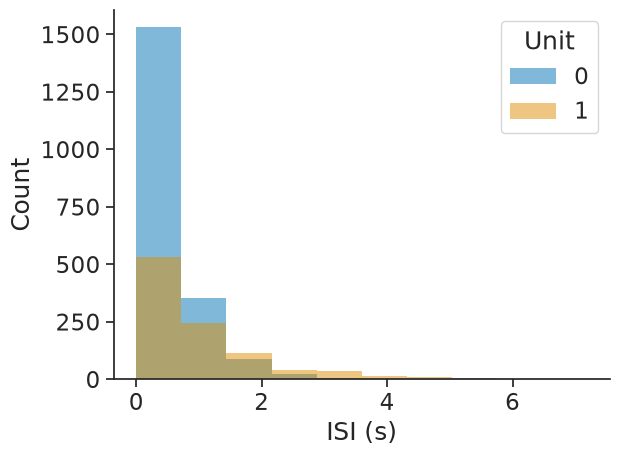
Interspike interval (ISI) distribution#
The interspike interval distribution shows how the time differences between subsequent spikes (events) are distributed.
The input can be any object with timestamps. Passing epochs restricts the computation to the given epochs.
The output will be a dataframe with the bin centres as index and containing the corresponding ISI counts per unit.
isi_distribution = nap.compute_isi_distribution(
    data=ts_group, bins=10, epochs=epoch
    )
print(isi_distribution)
             0    1
0.359565  1531  530
1.078521   352  243
1.797477    87  115
2.516432    22   42
3.235388     5   35
3.954343     1   13
4.673299     1   11
5.392255     0    7
6.111210     0    1
6.830166     0    2
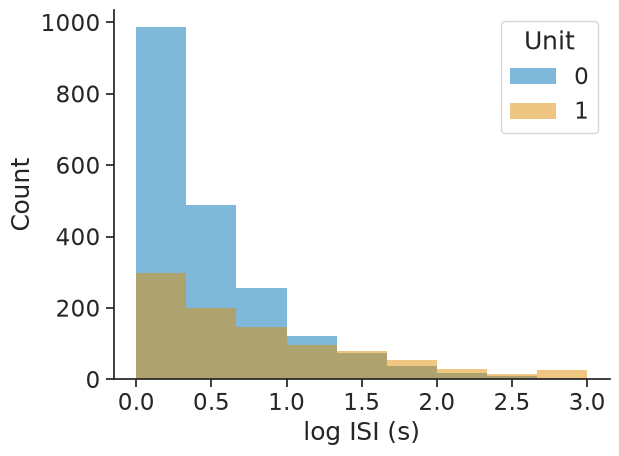
The bins argument allows for choosing either the number of bins as an integer or the bin edges as an array directly:
isi_distribution = nap.compute_isi_distribution(
    data=ts_group, bins=np.linspace(0, 3, 10), epochs=epoch
    )
print(isi_distribution)
            0    1
0.166667  986  298
0.500000  488  199
0.833333  257  146
1.166667  120   97
1.500000   75   78
1.833333   36   54
2.166667   18   28
2.500000   10   15
2.833333    5   27
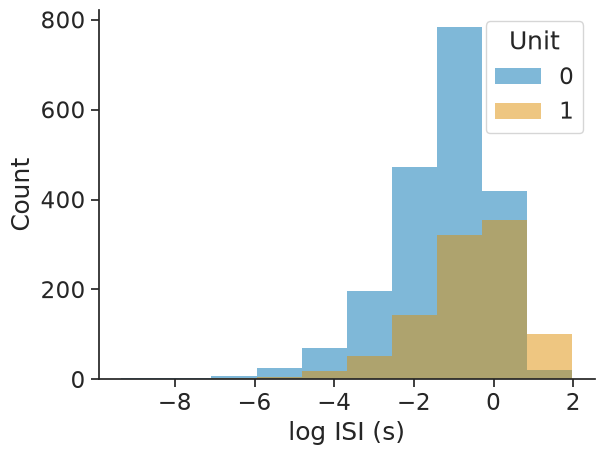
The log_scale argument allows for applying the log-transform to the ISIs:
isi_distribution = nap.compute_isi_distribution(
    data=ts_group, bins=10, log_scale=True, epochs=epoch
    )
print(isi_distribution)
             0    1
-8.778125    2    0
-7.646466    4    1
-6.514806    7    2
-5.383146   26    5
-4.251487   69   18
-3.119827  197   52
-1.988167  472  144
-0.856508  783  322
 0.275152  419  354
 1.406812   20  101